Dell XPS 13 9345 Laptop Review 2026: Is This Worth It?
The Dell XPS 13 9345 arrives as one of the most talked about ultraportable laptops of the year. It runs on a Snapdragon X Elite chip, weighs just 2.6 pounds, and promises battery life that lasts almost an entire day.
People who travel, work remotely, or simply want a sleek machine keep asking the same question. Does this laptop live up to the hype in 2026?
This review answers that question with real numbers, honest opinions, and hands on details. You will learn about the design, the screen, the keyboard, the performance, and the battery.
You will also see how it stacks up against rivals like the MacBook Air and the Lenovo Yoga Slim 7x. By the end, you will know if the Dell XPS 13 9345 deserves a spot in your bag. Let us get into it.
Key Takeaways
- The battery life is incredible. It lasts around 19 to 27 hours depending on the display and settings, which beats almost every rival on the market.
- The Snapdragon X Elite chip delivers strong speed. It outperforms the MacBook Air M3 in many benchmark tests and handles daily tasks with ease.
- The design feels futuristic and ultralight. At 2.6 pounds, it is one of the thinnest and lightest XPS laptops Dell has ever made.
- The display is bright but lacks rich color. It covers only about 67 percent of the DCI P3 gamut, so creative pros may want the OLED upgrade.
- The keyboard and ports are the weak spots. You get only two USB C ports, and the cramped keyboard takes time to learn.
- The price starts at 1,299 dollars, with higher tiers for more RAM, storage, and better screens.
What Is the Dell XPS 13 9345?
The Dell XPS 13 9345 is a premium ultraportable laptop built for people who value speed and portability. Dell launched it as part of the Copilot+ PC wave. This means it carries an NPU, or neural processing unit, for AI tasks. The headline feature is the Qualcomm Snapdragon X Elite processor, which uses ARM architecture instead of the usual Intel x86 design.
This shift matters a lot. ARM chips use less power, so the laptop runs cooler and lasts longer on a single charge. The 9345 model is the version Dell aims at battery focused buyers who still want top tier performance.
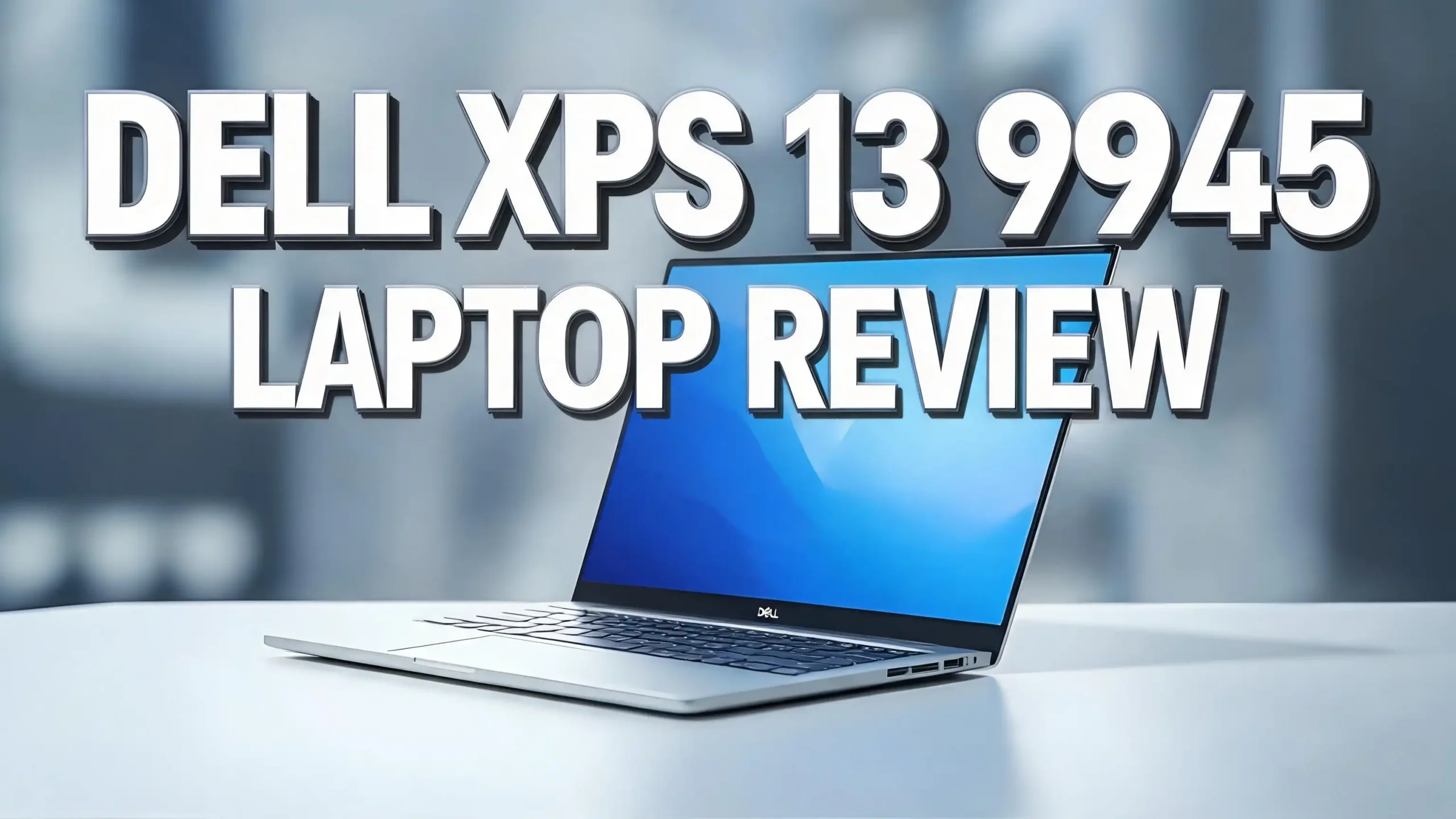
The laptop measures 11.62 by 7.84 by 0.6 inches and weighs only 2.6 pounds. That makes it lighter than the MacBook Air 13 inch M3. It fits in almost any bag without adding bulk. The graphite anodized metal body feels solid and looks clean.
Dell kept its signature InfinityEdge display with razor thin bezels. The screen flows almost to the edges, which gives you more viewing space in a small frame. This is the laptop for someone who wants power without weight. It targets students, business travelers, and anyone who hates carrying a heavy charger everywhere.
Dell XPS 13 9345 Design and Build Quality
The design is the first thing people notice. The Dell XPS 13 9345 looks like a piece of modern art. The lid uses graphite anodized metal that feels cool and premium to the touch. The curves and angles look carefully sculpted, not boxy or plain.
Open the lid and you see a bold interior. Dell removed the visible function row and replaced it with a touch based row that lights up. The keys sit flat with the deck, which gives the surface a smooth, seamless look. The touchpad blends into the palm rest with no visible borders.
This minimalist style splits opinions. Some users love the futuristic feel. Others miss the tactile feedback of physical function keys. The build quality, however, is hard to fault. The chassis feels rigid with almost no flex when you press on the keyboard or lid.
The InfinityEdge bezels shrink the footprint without shrinking the screen. At just 0.6 inches thick, the laptop slides easily into tight spaces. The hinge feels smooth and holds the screen at any angle. You can open it with one finger.
One small note. The laptop gets warm near the hinge during heavy use, reaching up to 120 degrees Fahrenheit there. The rest of the body stays comfortable. Overall, the design earns high marks for looks and durability.

- The first Copilot+ XPS has powerful, on-device AI that delivers cutting-edge...
- Snapdragon X Elite (12 Core Dual-Core Boost up to 4GHz, NPU up to 45 TOPS) X1E...
Last update on 2026-10-26 / Affiliate links / Images from Amazon Product Advertising API
Display Quality and Screen Options
The base Dell XPS 13 9345 comes with a 13.4 inch screen at 1920 by 1200 resolution and a smooth 120Hz refresh rate. The display is sharp and very bright, hitting around 456 nits. That brightness lets you use it outdoors or in well lit rooms without squinting.
The 120Hz refresh rate makes scrolling and window movement feel fluid. Text looks crisp, and the high pixel density keeps fine details clear. For everyday browsing, writing, and video calls, the screen does a great job.
The weak point is color. The base panel covers only about 66.9 percent of the DCI P3 color gamut. That number falls well below the premium laptop average of around 87 percent. Movies and photos can look a little washed out. Deep oranges and reds lose some of their punch.
If color matters to you, Dell offers two upgrades for an extra 300 dollars. You can pick a 2560 by 1600 panel at 500 nits, or a stunning OLED screen at 2880 by 1800 with rich colors and deep blacks. Photographers and video editors should choose the OLED option.
For most buyers, the standard screen works fine for office tasks and streaming. Just know that creative work demands the upgrade. The display is good, not perfect, in its base form.
Snapdragon X Elite Performance Tested
Performance is where the Dell XPS 13 9345 shines. It runs the Snapdragon X Elite X1E-80-100 chip paired with 16GB of RAM in the base model. This ARM based processor delivers fast and smooth daily performance that surprises many first time ARM users.
In the Geekbench 6 test, the XPS 13 scored 14,635 points. That crushes the average premium laptop, which sits near 8,927. It even beats the MacBook Air M3, which scored 12,087. The chip handles dozens of browser tabs, video playback, and background music with no stutter.
Video work also impresses. The laptop converted a 4K video to 1080p in just 4 minutes and 41 seconds using HandBrake. That is faster than the MacBook Air, the Asus Zenbook 14, and most rivals. The 512GB SSD reads and writes data quickly too, beating Apple in some storage speed tests.
There is one catch. ARM chips run Windows on ARM, so some older apps need emulation. Most popular programs now run natively, but a few niche tools may run slower or not at all. Check your key apps before you buy.
For office work, web browsing, coding, and media, the performance feels premium and responsive. Just remember this is not a gaming machine. The graphics chip is the weakest part of the package, which we cover below.
Top 3 Alternatives for Dell XPS 13 9345
The Apple MacBook Air 13 inch M3 is the top pick for color accuracy and the Apple ecosystem. It offers a wider, deeper keyboard and a brighter, more colorful screen.

- LEAN. MEAN. M3 MACHINE — With a powerful 8-core CPU and 10-core GPU, the blazing-fast...
- BUILT FOR APPLE INTELLIGENCE — Apple Intelligence helps you write, express yourself, and...
Last update on 2026-10-26 / Affiliate links / Images from Amazon Product Advertising API
The Lenovo Yoga Slim 7x brings a gorgeous 14.5 inch OLED touchscreen at 1000 nits. It also uses a Snapdragon X Elite chip, so battery life stays excellent. This is the choice for media lovers who want vivid color.

- [Upgraded] Seal is opened for Hardware/Software upgrade only to enhance performance...
- [Powerful Performance with Snapdragon X Elite X1E-78-100 ] Snapdragon X Elite X1E...
Last update on 2026-10-26 / Affiliate links / Images from Amazon Product Advertising API
The Asus Zenbook 14 OLED runs an Intel Core Ultra chip with Intel Arc graphics. It handles light gaming better than the XPS and includes more ports, including HDMI. Pick this one if you need versatile connections.

- PREMIUM PORTABILITY - The ASUS Zenbook 14 OLED features a slim, lightweight build paired...
- POWERFUL PERFORMANCE - Powered by the AMD Ryzen AI 9 465 processor (10 cores, up to...
Last update on 2026-10-26 / Affiliate links / Images from Amazon Product Advertising API
Battery Life That Lasts All Day
Battery life is the strongest selling point of the Dell XPS 13 9345. The Snapdragon X Elite chip sips power, which lets the laptop run far longer than most rivals. Dell claims up to 27 hours on the FHD+ model with light use.
Independent testing backs this up. In the Laptop Mag battery test, the XPS 13 averaged 19 hours and 1 minute. After a BIOS update, that number climbed to 20 hours and 51 minutes. Those results crush the competition by a wide margin.
For comparison, the MacBook Air M3 lasted about 15 hours in the same test. The Asus Zenbook 14 managed nearly 16 hours. The HP Spectre x360 reached only 11 hours. The XPS 13 outlasted every one of them.
This means you can work a full day without reaching for a charger. You can fly across the country, finish a workday, and still have power left. Real world use easily clears the 15 to 18 hour range with normal brightness and mixed tasks.
The 55Wh battery, combined with the efficient chip, makes this possible. The OLED model drains faster, but it still beats most Intel laptops. If battery life ranks high on your list, the Dell XPS 13 9345 is one of the best choices you can buy in 2026.
Keyboard and Touchpad Experience
The keyboard is the most divisive part of the Dell XPS 13 9345. It looks clean and modern with flat keys that sit level with the deck. The zero lattice design removes the gaps between keys, which gives a sleek appearance.
The typing feel is mixed. The keys are not clicky, but they are not bad either. The main problem is the cramped layout. Because the laptop is so small, the keys sit close together. The backspace key feels smaller than expected, which leads to typos.
In testing, typing speed dropped from 81 words per minute to 76 on this keyboard. That is a small but noticeable hit. New users need a few days to adjust to the tight spacing. After that, most people type fine.
The touch based function row also splits opinions. It uses capacitive buttons instead of physical keys. They light up to show media and brightness controls. The lack of haptic feedback there feels unsatisfying. You press a button and feel nothing.
The touchpad, on the other hand, works well. It uses a seamless haptic design that blends into the palm rest. The haptic feedback feels solid and precise. Clicks register reliably anywhere on the surface. Gestures feel smooth and responsive.
Overall, the touchpad earns praise while the keyboard needs patience. If you type all day, test it in a store first.
Ports and Connectivity Options
Here is where the ultralight design forces a trade off. The Dell XPS 13 9345 includes only two USB Type C ports. You get one on each side of the laptop. That is the full extent of the physical connections.
This setup will frustrate some users. There is no USB A port, no HDMI output, and no headphone jack on some configurations. If you use a mouse, monitor, and external drive at once, two ports run out fast.
The good news is both ports support fast data and charging. You can charge the laptop and connect a device at the same time. Still, most people will need a USB C hub or dock. A small hub adds HDMI, USB A, and card reader options for desk use.
On the wireless side, the laptop shines. It supports Wi Fi 7, the latest and fastest standard. This gives you quicker downloads and a stronger connection on modern routers. Bluetooth keeps your headphones and mouse connected without lag.
The lack of ports is the price you pay for the thin chassis. Dell chose portability over connectivity. If you live a wireless lifestyle, this works fine. If you need many wired connections, budget for an accessory. Plan ahead so you are not caught short on a busy workday.
AI Features and Copilot+ Capabilities
The Dell XPS 13 9345 is a Copilot+ PC, which means it carries special AI hardware. The Snapdragon X Elite chip includes a Qualcomm Hexagon NPU. This neural processing unit handles AI tasks without draining the main processor or the battery.
This NPU powers several smart features in Windows 11. Windows Studio Effects improves your webcam with background blur and eye contact correction. Live Captions turn any audio into text on screen in real time. These tools help during video calls and meetings.
The most talked about feature is Recall. It works like a searchable history of everything you did on your PC. You can scroll back and find a document or website you viewed hours ago. The data stays stored locally on your device, and you can control what it saves. It stays off by default for privacy.
The laptop also runs AI art tools and the Copilot assistant. Copilot helps you draft text, answer questions, and manage settings with voice or text commands. These features run faster because the NPU does the heavy lifting.
Keep in mind that AI features keep growing. Microsoft adds new tools through updates. The XPS 13 9345 has the hardware to support them for years. If you want a laptop ready for the AI future, this machine checks that box well.
Graphics and Gaming Performance
Graphics are the clear weak spot of the Dell XPS 13 9345. The Qualcomm Adreno GPU inside the Snapdragon chip falls behind rivals in this area. This is not a gaming laptop, and the numbers prove it.
In the 3DMark Fire Strike test, the XPS 13 scored 5,635. The average premium laptop hits around 9,218. Intel Arc graphics in the Asus Zenbook 14 reached 8,064 in the same test. The XPS trails by a large gap.
Gaming results tell the same story. In a Civilization VI benchmark at 1080p medium settings, the laptop averaged just 23 frames per second. That sits below the 30 fps mark needed for smooth play. The MacBook Air M3 managed 41 fps in the same test.
So what can you do on it? The GPU handles light tasks fine. You can play simple indie games, browser games, and older titles at low settings. Photo editing and basic video work run okay. Demanding modern games are off the table.
ARM compatibility adds another limit. Many games do not run natively on Windows on ARM, and emulation hurts performance further. If gaming matters to you, look elsewhere.
The takeaway is simple. Buy this laptop for work, study, and battery life. Do not buy it for gaming or heavy 3D graphics. Dell built this machine for productivity, and the graphics reflect that focus.
Webcam, Audio, and Speakers
The Dell XPS 13 9345 includes a 1080p webcam that performs better than most laptop cameras. It handles tricky lighting well. When a bright window sits behind you, the camera keeps your face visible instead of turning it into a dark blur.
The webcam captures good detail and accurate colors. You can see fine textures in clothing and hair. It also supports Windows Hello face login with an IR sensor. This lets you unlock the laptop just by looking at it, which is fast and secure.
For video calls and meetings, this camera does the job well. You will not need an external webcam for most situations. Combined with the Windows Studio Effects AI tools, your video looks clean and professional.
The audio is a weaker area. The side firing speakers sound sharp but hollow. They produce clear vocals and crisp highs, but the bass is thin. Music can sound flat, and busy tracks blend together. The percussion often drowns out softer background sounds.
For video calls, podcasts, and casual YouTube, the speakers work fine. For music lovers, they disappoint. You will want headphones or a Bluetooth speaker for serious listening. Dell also ships the laptop without dedicated audio software, so you cannot tweak the sound much.
In short, the webcam impresses while the speakers fall short. The camera is a real strength for remote workers and students who attend many video meetings.
Dell XPS 13 9345 Price and Configurations
The Dell XPS 13 9345 starts at 1,299 dollars for the base model. That price gets you the Snapdragon X Elite chip, 16GB of RAM, a 512GB SSD, and the standard FHD+ 120Hz display. This setup suits most everyday users well.
Dell offers several upgrade paths. For 1,599 dollars, you jump to 32GB of RAM and a 1TB SSD. For 2,199 dollars, you get 64GB of RAM and a 2TB SSD. Power users and multitaskers will appreciate the extra memory and storage.
You can also upgrade the display on any tier. Adding 300 dollars gets you either the sharper 2560 by 1600 panel at 500 nits or the rich OLED screen at 2880 by 1800. The OLED upgrade is the best value for anyone who cares about color and contrast.
Amazon often lists several versions of this laptop, including Snapdragon X Plus and X Elite models with varied RAM and storage. Prices shift with sales and bundles, so compare configurations before you buy. Look for deals during major shopping events.
When you weigh the price, remember what you get. The battery life and chip performance justify the cost for many buyers. The base model offers strong value at 1,299 dollars. If you need top color or more storage, the upgrades are worth it. Pick the version that fits your work and budget.
- The first Copilot+ XPS has powerful, on-device AI that delivers cutting-edge...
- Snapdragon X Elite (12 Core Dual-Core Boost up to 4GHz, NPU up to 45 TOPS) X1E...
Last update on 2026-10-26 / Affiliate links / Images from Amazon Product Advertising API
How the XPS 13 9345 Compares to Rivals
The Dell XPS 13 9345 faces tough competition in 2026. Its biggest rival is the MacBook Air 13 inch M3. The XPS wins on raw benchmark speed and battery life. The MacBook Air wins on color accuracy, keyboard comfort, and starting price.
The Air offers a wider, deeper chassis, which makes typing easier. Its screen also shows richer color, covering more of the gamut. If you prefer macOS and better color, the Air is the safer pick. If you want longer battery and faster benchmarks, the XPS leads.
Against the Lenovo Yoga Slim 7x, the comparison gets interesting. Both use Snapdragon X Elite chips, so battery life stays strong on each. The Yoga adds a stunning 14.5 inch OLED touchscreen at 1000 nits. That display beats the XPS base panel by a wide margin.
The Yoga also offers a touchscreen and a slightly larger screen for media. The XPS counters with a lighter, more compact body and that iconic Dell design. Choose based on whether you want portability or a bigger, brighter screen.
The Asus Zenbook 14 OLED runs Intel chips with better graphics and more ports. It handles light gaming and wired connections better than the XPS. But its battery life trails far behind.
So the XPS 13 9345 stands out for battery life, weight, and chip speed. Rivals beat it on color, ports, and graphics. Your priorities decide the winner.
Who Should Buy the Dell XPS 13 9345?
The Dell XPS 13 9345 is not for everyone, but it fits certain buyers perfectly. Frequent travelers will love it most. The 2.6 pound weight and all day battery let you work anywhere without a charger. It slides into any bag with ease.
Business professionals are another great match. The fast chip handles email, documents, video calls, and dozens of browser tabs without slowing down. The strong webcam and AI features make remote meetings smooth and clear.
Students also benefit from this laptop. The long battery lasts through a full day of classes. The light body makes it easy to carry across campus. The AI tools help with note taking and writing tasks. It is a reliable study companion.
Who should skip it? Gamers and 3D artists should look elsewhere. The weak graphics chip cannot handle modern games or heavy rendering. People who need many wired ports will also feel limited by just two USB C connections.
Color sensitive creatives should only buy the OLED version, not the base screen. And anyone who types all day should test the cramped keyboard first. Some hands adjust, others never do.
In short, buy the Dell XPS 13 9345 if you want a premium, ultralight productivity machine with class leading battery life. Pass on it if you need gaming power, lots of ports, or perfect color out of the box.
Final Verdict on the Dell XPS 13 9345
The Dell XPS 13 9345 earns a strong recommendation for the right buyer. It nails the core things that matter for portable work. The battery life is the best in its class, the chip is fast, and the design feels premium and futuristic.
This laptop proves that ARM based Windows machines have arrived. The Snapdragon X Elite delivers speed that beats the MacBook Air M3 in many tests while using far less power. That combination of speed and stamina is rare.
It is not flawless, though. The base display lacks rich color, the keyboard feels cramped, and you get only two ports. The graphics chip cannot handle gaming. These are real trade offs that some users will not accept.
But for travelers, students, and office workers, the strengths outweigh the flaws. You get a machine that works all day, weighs almost nothing, and runs everything you need. Add the OLED upgrade if color matters, and most complaints fade away.
At a starting price of 1,299 dollars, the value holds up well in 2026. The XPS 13 9345 stands as one of the best ultraportable laptops you can buy. If portability and battery life top your wish list, this Dell deserves your attention.
Frequently Asked Questions
Is the Dell XPS 13 9345 good for gaming?
No, the Dell XPS 13 9345 is not built for gaming. The Qualcomm Adreno graphics chip is weak compared to rivals. It can run simple indie games and older titles at low settings. Modern games will not run smoothly. Buy this laptop for work and study, not for gaming.
How long does the Dell XPS 13 9345 battery last?
The battery life is excellent. Dell claims up to 27 hours on the FHD+ model. Independent tests measured around 19 to 21 hours of real use. This easily beats the MacBook Air and most Intel laptops. You can work a full day without a charger.
Does the Dell XPS 13 9345 run Windows on ARM?
Yes, it uses the Snapdragon X Elite ARM chip and runs Windows on ARM. Most popular apps now run natively. Some older or niche programs use emulation, which can slow them down. Check that your key apps support ARM before you buy.
What ports does the Dell XPS 13 9345 have?
The laptop has only two USB Type C ports, one on each side. There is no USB A, HDMI, or built in card reader. It supports Wi Fi 7 and Bluetooth for wireless needs. Most users will want a USB C hub for extra connections.
Is the Dell XPS 13 9345 worth buying in 2026?
Yes, for the right buyer. It offers class leading battery life, fast performance, and an ultralight design. It works best for travelers, students, and office workers. Skip it if you need gaming power, many ports, or perfect color in the base model.
How much does the Dell XPS 13 9345 cost?
The base model starts at 1,299 dollars with 16GB RAM and a 512GB SSD. Upgrades go up to 2,199 dollars for more RAM and storage. A display upgrade to OLED or higher resolution costs an extra 300 dollars. Prices vary with sales and retailers.

I’m Lipi, a passionate blogger with a keen interest in artificial intelligence and its applications. On my blog, lipiai.blog, I share information about AI, review different AI tools, and provide helpful guides. My goal is to make AI easy to understand for everyone. I enjoy simplifying complex ideas so that both beginners and tech-savvy folks can learn.